

Today, Fashion, Lifestyle and Beauty (FLB) event organizers are prioritizing tighter security around restricted areas without slowing down the flow of guests and staff. But with so many tasks to keep on top of, managing who can enter each space, from backstage to a VIP lounge, puts added pressure on your team.
Each space has different permissions to verify. When those checks rely on printed lists, colored wristbands and manual processes, uncertainty can create bottlenecks at entrances or lead to people being admitted to areas they shouldn’t enter. Your team is left trying to balance a smooth guest experience with the responsibility of keeping restricted spaces under control.
That’s why we’ve introduced Zone Access Management within Launchmetrics Events, helping your team stay in control of who goes where without the time-consuming manual checks. With access verified through a single RFID bracelet scan, your team can keep people moving and give more attention to the rest of the event. Read on to learn how it works.
What is Zone Access Management?
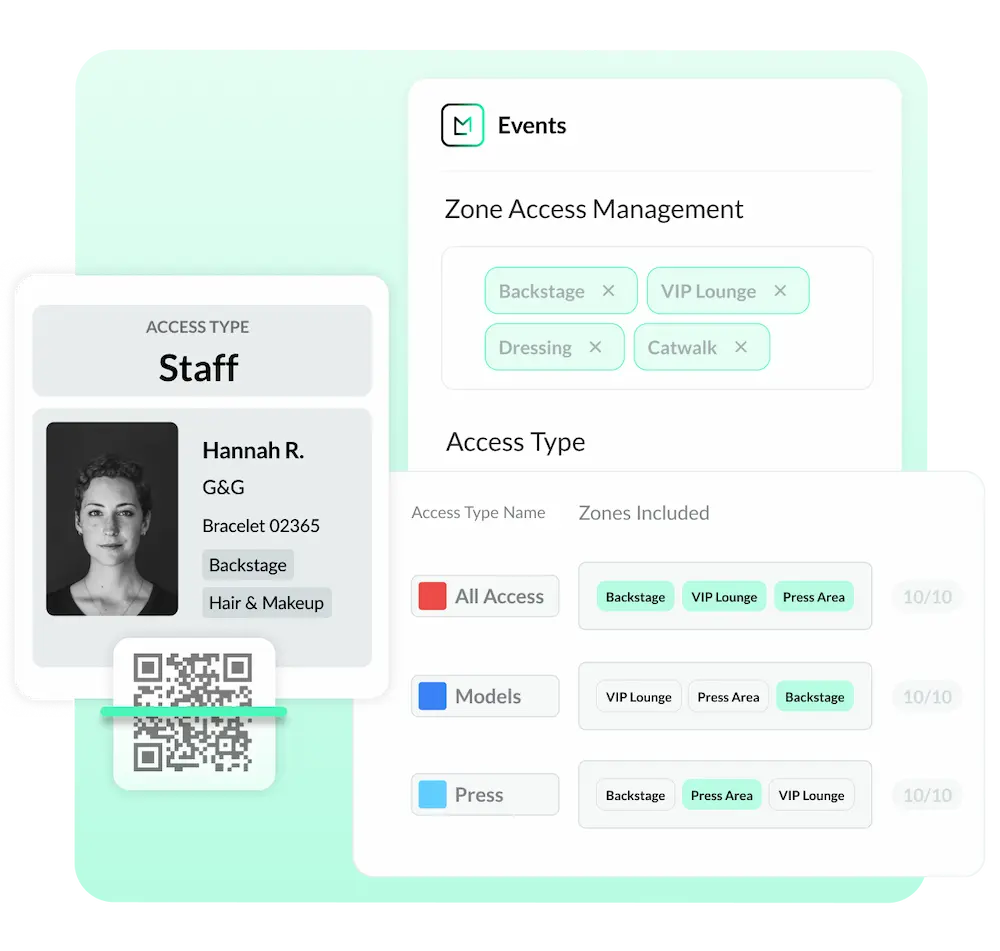
Zone Access Management is a new feature within Launchmetrics Events that helps you to seamlessly define, control and verify who can enter restricted areas during an event. It connects the access permissions you plan in advance with the checks your team carries out on the day.
This means your team can decide who can go where in advance, so no one has to work it out at the entrance. Each guest or staff member’s permissions are then linked to their RFID bracelet at check-in. The result: when they arrive at a restricted area, a single scan instantly confirms whether they’re allowed in.
What Zone Access Management Means for Your Team:
- Clear permissions for every space: Set up access around your event’s needs, whether you’re managing dressing rooms, backstage or the front row at a fashion show.
- A clear answer at each entrance: Every scan shows Admitted or Not Admitted, along with the person’s photo, name, company and access type.
- Less time assigning access: Use filters and bulk actions or an Excel import to assign access types across your guest and staff lists.
- A record to look back on: Review every scan in the Access Report, then filter and export the details by zone or access type.
How Zone Access Management Works in Launchmetrics Events
Before the Event: Put Access Permissions in Place

Whether you’re reserving backstage for styling teams or a lounge for top clients, you can decide who belongs where ahead of the event. By defining restricted zones and creating access types for each group, you choose which areas they can enter. These access types can be assigned to guests and staff through bulk actions or an Excel import, saving your team from updating people one by one. You can also match each access type’s color to its physical bracelet, giving your team a visual reference when checking entry.
At Check-In: Make Those Permissions Ready to Use

Guests and staff follow your usual check-in process through the Events iOS app, using a QR code or manual check-in. For anyone with an assigned access type, your team pairs an RFID bracelet with their profile by holding it close to the scanner. That bracelet is now linked to the areas they’re allowed to enter, so accredited press and top clients can share the same welcome process while retaining their different access permissions.
During the Event: Give Your Team a Clear Answer

When someone is arriving at a restricted area, your team needs to seamlessly confirm access without holding up the flow. With the relevant zone selected in the app, each bracelet scan returns a green Admitted or red Not Admitted result alongside the person’s photo, name, company and access type.
This lets your team check identity and permission together, without searching a separate list. Someone with backstage access might still be denied entry to a VIP lounge, with each result reflecting the permissions you assigned in advance.
After the Event: Understand How Access Ran

Once the event wraps, the Access Report gives your team a record of who was scanned at each zone, when and whether access was admitted or denied. Beyond supporting your debrief, these details can help you:
- Plan staffing around busy periods: Peaks in scan activity help you assess where more door staff or scanners may be needed, when to open zones and whether to stagger arrivals by guest tier.
- Review unusual access activity: Repeated denied attempts by the same person or scans outside expected hours give your team specific incidents to investigate.
- Inform PR and sales follow-up: See which groups recorded admitted scans at your exclusive spaces such as a showroom or VIP lounge, giving your teams more context for their next conversation.
Detailed scan logs can be filtered and exported by zone or access type, helping you turn activity from this event into decisions for the next.
Ready to bring Zone Access Management to your next event?
Zone Access Management is one more way Launchmetrics Events helps take the pressure off your team. By bringing guest lists, invitations, RSVPs, collaborative seating and on-site check-in with QR codes or RFID into one platform, Events centralizes the details and streamlines the work behind them. Your team can collaborate more easily during planning, stay coordinated on the day and review attendance and access activity through post-event reporting.
Book a personalized demo to see how Launchmetrics Events can make your next event easier to manage. Already using Events? Contact your Customer Success Manager to learn how to activate Zone Access Management.
See Zone Access Management in Action
Explore how Zone Access Management works within Launchmetrics Events to make your experience as seamless as ever.

By Pawandeep Kaur


